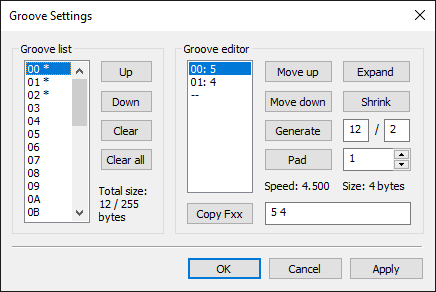
The groove settings dialog is used to edit and manage the module's grooves.
A groove is a sequence of speed commands that changes the speed every row. This can be used in place of long chains of Fxx commands to save pattern data.
Each module may store up to:
Lists the module's groove data.
Up
Moves the selected groove data up one index.
Down
Moves the selected groove data down one index.
Clear
Deletes the selected groove data.
Clear all
Deletes all groove data.
The groove editor allows the user to modify the groove pattern.
Move up
Moves the selected speed command up.
Move down
Moves the selected speed command down.
Generate
Generates a speed sequence x / y, or
x ticks in y rows. Inputs for x and y are provided in the
textboxes next to the button. The sequence won't be generated if the resulting speed is less than one.
Pad
Padding inserts the specified entry after each groove
entry, so that the average speed is halved. All entries in the groove must
be greater than the pad amount.
Expand
Halves the groove's average speed and works only if
all entries are greater than or equal to 2.
Shrink
Doubles the average speed and works only when the
groove length is a multiple of 2.