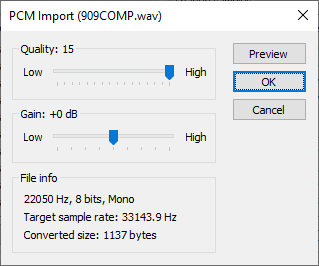
This feature is used to convert Microsoft wave files (.wav) to
1-bit DPCM samples, as used by the NES hardware's sample
channel.
The format of the wave files must be .wav PCM, no compressed
audio formats are supported.
Sample rate, sample size and channel count doesn't matter, the
file will be resampled according to the quality setting.
Choose import in
the DPCM instrument editor dialog, select a file and you will be asked to select
a quality and volume
setting:
Maximum supported size of one DPCM sample is 4 kB (4081 bytes).
At rate 15 (33.14394 kHz NTSC / 33.2521 kHz PAL), the play length
is a little less than a second, while the lowest rate 0 (4.18171
kHz NTSC / 4.17740 kHz PAL) lasts about eight seconds.