Bookmark manager
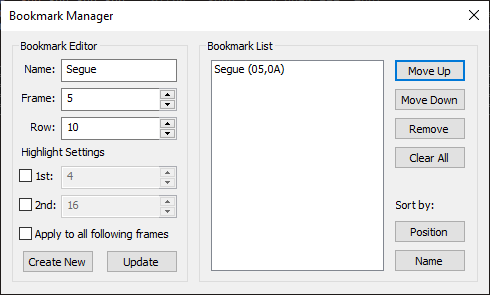
The bookmark manager is used to manage bookmarks.
Bookmark
A bookmark is a highlight in the pattern editor at a specified frame and row.
It resets the row highlight pattern, and may define a new row highlight pattern.
Each bookmark contains:
- A name, which defaults to "Bookmark" and comes with an index if
created from the pattern editor directly;
- A frame index and a row index, which indicate the position of
the bookmark. Bookmarks reposition themselves upon performing frame
actions such as inserting or removing frames;
- Highlight settings which override the previous value of the
track if enabled. Using bookmarks, it is possible to change the row
highlight intervals in the middle of a track. Disabling "Apply to
all following frames" will keep the highlight distance to the
current frame, so that the next frame will not use the settings of
this bookmark.
Bookmark Editor
This allows the user to modify a bookmark.
Bookmark List
Lists the module's bookmark data.
Move Up
Moves the selected bookmark up one index.
Move Down
Moves the selected bookmark down one index.
Remove
Deletes the selected bookmark.
Clear all
Deletes all bookmark data.
The bookmark list supports these keyboard shortcuts:
- Ctrl + Up / Down for moving the currently selected bookmark;
- Insert for creating a new bookmark;
- Delete for removing the currently selected bookmark.